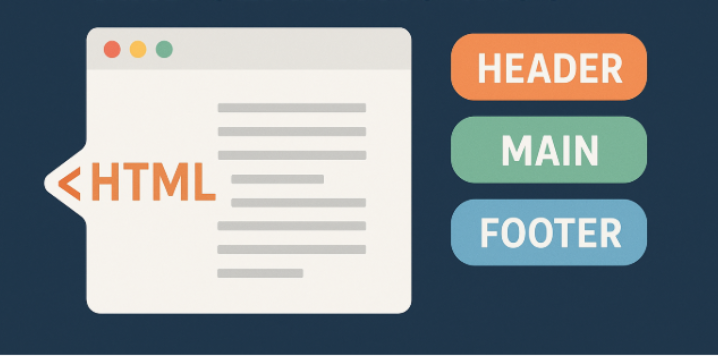
HTML (Hypertext Markup Language) is the foundation of every web page. It defines the structure of a webpage and helps browsers understand how different elements, such as headings, paragraphs, images, links, and forms, should be organized. In this article, we’ll explore the basic structure of an HTML document and understand the role of semantic tags in modern web development.
You’ll learn about essential HTML elements, important features of HTML, the benefits of semantic markup, and the differences between semantic and non-semantic tags. Whether you’re a beginner or an experienced developer, understanding these concepts will help you write cleaner, more accessible, and maintainable code.
If you have not checked my past article about HTML introduction then you can check it here.
Understanding HTML: A Key to Effective Web Development and SEO
Table of contents:
- HTML Document Structure
- Features of HTML
- Benefits of Semantic HTML
- Difference Between Semantic and Non-Semantic Tags
- Best Practices for Writing Semantic HTML
1 – HTML Document Structure
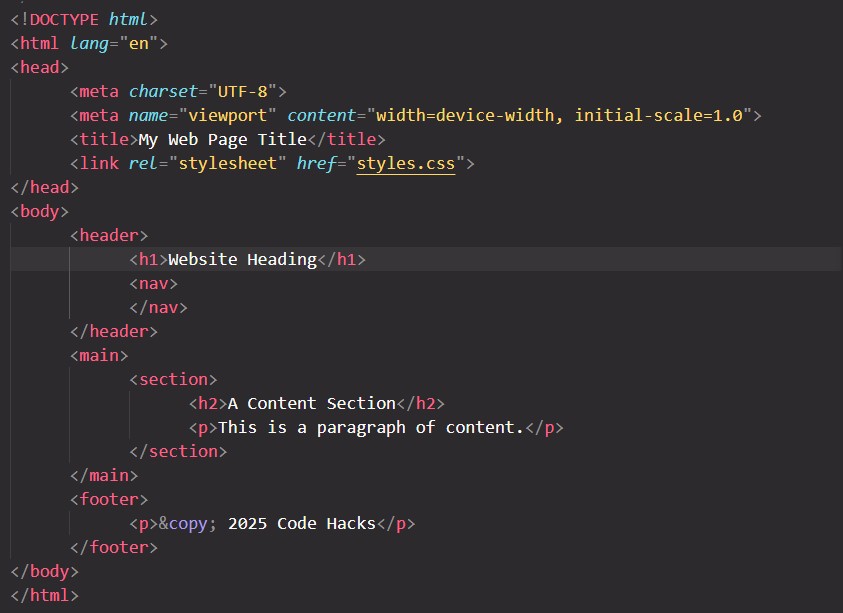
Every standard HTML document follows a basic structure that tells the browser how to interpret and display the webpage. A well-structured document separates metadata from visible content and organizes information logically.
Here is a simple example of an HTML document:
1.1 – <!DOCTYPE html>
The DOCTYPE declaration tells the browser to use standards mode when rendering the HTML document. It is not an HTML element and does not require a closing tag.
1.2 – <html>
The <html> element is the root of the document and contains the page’s <head> and <body> elements.
The lang attribute specifies the primary language of the webpage. For example, lang="en" indicates English. Declaring the language helps screen readers pronounce content correctly and assists browsers and search engines in interpreting the page.
1.3 – <head>
The <head> element contains information about the webpage that is generally not displayed as visible page content.
Common elements inside <head> include:
<meta charset="UTF-8">: Defines the character encoding so that a wide range of characters and symbols can be displayed correctly.<title>: Sets the title displayed in the browser tab and may be used as the title link in search results.<link>: Connects external resources, such as CSS stylesheets.<script>: Includes or references JavaScript code.<meta name="viewport" ...>: Helps the webpage use an appropriate viewport on mobile devices.
For example, the following code connects an external stylesheet:
<link rel="stylesheet" type="text/css" href="style.css">Keeping metadata organized in the <head> makes your HTML document easier to understand and maintain.
1.4 – <body>
The <body> element contains the content presented to visitors, including headings, paragraphs, images, navigation links, forms, and other page elements.
For example:
<body>
  <h1>About Us</h1>
  <p>We provide web design and development services.</p>
  <a href="https://example.com">Learn More</a>
</body>The <body> element is also where semantic elements such as <header>, <nav>, <main>, <article>, and <footer> are commonly used to organize the page.
2 – Features of HTML
HTML provides several important features that make it essential for web development.
2.1 – Markup Language
HTML uses elements and tags to describe the structure and meaning of webpage content. For example, <h1> represents a top-level heading, while <p> represents a paragraph.
Browsers interpret this markup to display content in a structured format.
2.2 – Platform Independence
HTML is supported by modern web browsers across different operating systems and devices. A properly developed webpage can therefore be accessed on Windows, macOS, Linux, Android, and iOS without requiring a separate HTML version for each platform.
2.3 – Browser Compatibility
Modern browsers, including Chrome, Firefox, Safari, and Edge, support HTML standards. However, developers should still test their websites across browsers and screen sizes to identify differences in rendering and functionality.
2.4 – Semantic Elements
HTML includes semantic elements such as <header>, <nav>, <main>, <article>, <section>, and <footer>. These elements communicate the purpose of different content areas, making webpages easier for developers, users, and assistive technologies to understand.
2.5 – Multimedia Support
HTML supports multimedia through elements such as <img>, <audio>, and <video>. These features allow developers to display images and embed audio or video content without depending on outdated browser plug-ins.
2.6 – Responsive Design Support
HTML works with CSS to create responsive websites that adapt to different screen sizes. The viewport metadata helps browsers display pages appropriately on mobile devices, while CSS media queries and flexible layouts control how content adjusts to available space.
2.7 – Forms and Input Validation
HTML provides form elements such as <form>, <input>, <select>, and <textarea>. Attributes like required, type="email", and minlength can provide basic browser-based validation.
These features improve the user experience, although server-side validation is still necessary when processing submitted data.
2.8 – Integration with Other Technologies
HTML works alongside CSS and JavaScript to build modern websites. HTML defines the structure, CSS controls presentation, and JavaScript adds interactive behavior. Together, these technologies form the foundation of frontend web development.
3 – Benefits of Semantic HTML
3.1 – Improved Accessibility
Semantic elements help assistive technologies identify page regions and content roles. This can make navigation easier for people who use screen readers or other accessibility tools.
3.2 – Better Code Readability
Meaningful elements make the purpose of different sections clear to developers. For example, <nav> communicates the purpose of a navigation area more clearly than a <div> with no descriptive context.
3.3 – Easier Maintenance
Semantic markup creates a logical document structure, making it easier to update a website as its content grows.
3.4 – SEO Support
Semantic HTML helps search engines interpret the structure and meaning of webpage content. Although semantic tags alone do not guarantee higher rankings, clear headings, meaningful links, and well-organized content contribute to a better website experience.
3.5 – More Consistent Structure
Using standard HTML elements encourages developers to follow familiar conventions, which can make collaboration and code reviews easier.
4 – Difference Between Semantic and Non-Semantic Tags
| 1 – Semantic HTML tags provide meaningful context about the content. 1 – Non-semantic tags offer no inherent meaning, serving only as generic containers for styling and structure. |
| 2 – Semantic tags improve accessibility, search engine optimization (SEO), and code readability. 2 – Non-semantic tags are used when no other specific tag fits and are often given classes or IDs to convey purpose. |
3 – Semantic tags example: <header>, <footer>, <nav> etc.3 – Non-semantic tags example: <div>, <span> etc. |
5 – Best Practices for Writing Semantic HTML
Follow these practices to create well-structured HTML documents.
- Use meaningful elements: Choose semantic tags according to the purpose of the content rather than selecting elements solely for their default appearance.
- Organize headings logically: Use headings from
<h1>to<h6>according to the hierarchy of your content. Avoid choosing heading levels only because of their visual size. - Add descriptive image text: Provide appropriate
alttext for informative images. Decorative images can use an emptyaltattribute. - Use descriptive link text: Link labels such as “Read the HTML guide” are generally more informative than vague text such as “Click here.”
- Declare the page language: Add an appropriate
langattribute to the<html>element. - Validate your markup: Check your HTML for invalid nesting, missing attributes, and other structural issues.
- Use CSS for presentation: Prefer CSS for controlling colors, spacing, and layout instead of selecting HTML elements purely for their default styling.
Following these practices helps you build websites that are easier to maintain, more accessible, and better organized.
Conclusion
Understanding HTML document structure and semantic tags is an essential step toward becoming a proficient web developer. The basic document elements establish the foundation of every HTML page. When semantic elements used appropriately, they improve code readability, support accessibility, and help search engines interpret webpage content. Start applying semantic HTML in your projects and combine it with CSS and JavaScript to create well-structured, user-friendly websites.
If you enjoyed this article, we’d love to hear your thoughts. Feel free to share your feedback, questions, or suggestions in the comments section below.
If you have any questions or would like to get in touch with us, please don’t hesitate to reach out us.