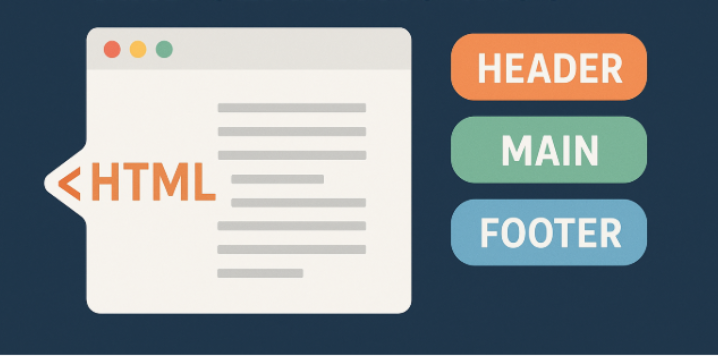
HTML (Hypertext Markup Language) is the foundation of every web page. In this article, we’ll explore the structure of an HTML document and dive into the role of semantic tags in modern web development. You’ll learn why semantic HTML is important, how it differs from non-semantic tags, and how it improves both accessibility and maintainability. Whether you’re just starting your journey in web development or have years of experience, this guide will help you better understand how HTML works behind the scenes and how to structure your code effectively for the web.
Table of contents:
- HTML Document Structure
- Features of HTML
- Importance of HTML Semantic Tags
- Difference between Semantic and Non-semantic Tags
1 – HTML Document Structure
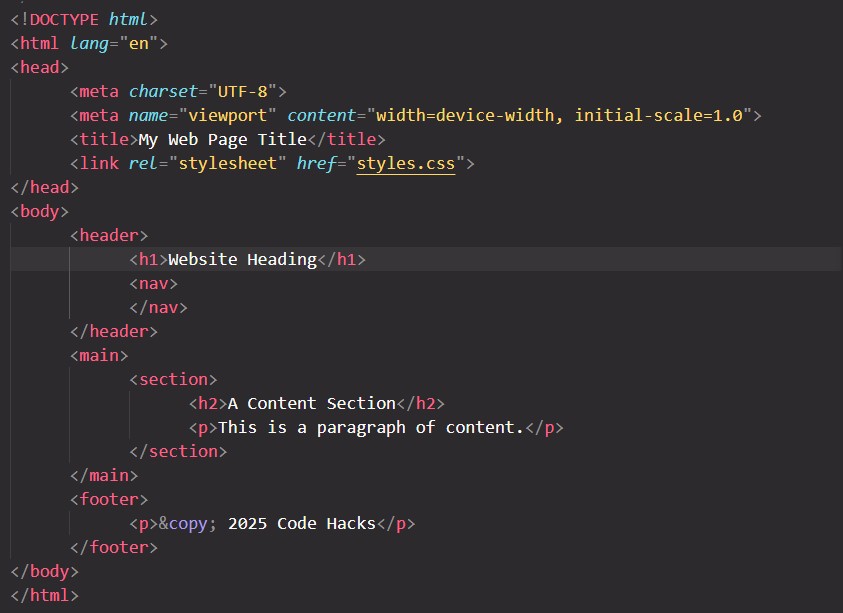
1.1 – <!DOCTYPE html>
Declaration: This is not an HTML tag, but a declaration that tells the browser which version of HTML the document is written in.
1.2 – <html>
Root Element: This is the container for all other HTML elements. It defines the beginning and end of the document.
Best Practice: It often includes the lang attribute to declare the document’s language (e.g. lang="en"), which aids accessibility and search engines.
1.3 – <head>
Metadata Container: This section holds machine-readable information (metadata) about the HTML document that is not displayed on the page itself.
Key elements inside <head>:
<meta charset="UTF-8">Specifies the character encoding, which is vital for correctly displaying text from different languages.<title>Sets the title that appears in the browser tab or window title bar, and is important for SEO and accessibility.<link>Used to link external resources, most commonly CSS stylesheets. (e.g.,<link rel="stylesheet" href="style.css">)<script>Used to embed or link executable code (JavaScript).<meta name="viewport" ...>Important for making the page responsive on different devices.
1.4 – <body>
Visible Content Container: This section contains all the content (text, images, links, etc.) that the user can see and interact with on the webpage.
Content Elements inside <body>
- Headings:
<h1>through<h6> - Paragraphs:
<p> - Lists:
<ul>,<ol>,<li> - Links:
<a> - Images:
<img> - Semantic elements:
<header>,<nav>,<main>,<section>,<footer>etc.
2 – Features of HTML
2.1 – Markup Language
HTML uses a system of tags (like <p> for a paragraph or <h1> for a heading) to annotate and define the structure of a document. These tags tell a web browser how to display the content.
2.2 – Platform independence
HTML is a universally supported standard that can be displayed on any device with a web browser, regardless of its operating system.
2.3 – Browser compatibility
All major web browsers, including Chrome, Firefox, and Safari, support and interpret HTML. This ensures that websites are accessible everywhere.
2.4 – Semantic elements
New structural tags like <header>, <footer>, <article>, and <nav> make web content more meaningful and understandable for both developers and search engines. This also improves accessibility.
2.5 – Multimedia support
HTML5 includes built-in tags like <video> and <audio> for embedding rich media directly into a web page, removing the need for third-party plug-ins like Flash.
2.6 – Responsive design
Features like flexible images and the viewport <meta> tag allow developers to create websites that automatically adapt their layout and appearance to fit any screen size.
2.7 – Forms and validation
Enhanced form elements and the required attribute enable the creation of robust forms that can validate user input in the browser before submitting it.
2.8 – Integration with other technologies
HTML works seamlessly with other core web technologies.
3 – Importance of Semantic HTML Tags
Here, I’d like to share some statistics and SEO reports from 2024 that highlight the importance of using Semantic HTML Tags.
Semantic HTML is not a direct ranking factor, but it is still highly important for SEO and web content optimization.
– John Mueller (Senior Search Analyst – Google)
73.9% of all websites use at least some semantic markup for SEO and web content performance.
– Semantic Markup Technology Rankings and Usage Statistics
While it doesn’t break down the usage of specific semantic tags, the 2024 results indicate a strong positive sentiment towards using standard HTML features.
– Devographics Annual Survey 2024
4 – Difference between Semantic and Non-semantic Tags
| 1 – Semantic HTML tags provide meaningful context about the content. 1 – Non-semantic tags offer no inherent meaning, serving only as generic containers for styling and structure. |
| 2 – Semantic tags improve accessibility, search engine optimization (SEO), and code readability. 2 – Non-semantic tags are used when no other specific tag fits and are often given classes or IDs to convey purpose. |
3 – Semantic tags example: <header>, <footer>, <nav> etc.3 – Non-semantic tags example: <div>, <span> etc. |
If you like this article, then you can write your words in the comments section. Or if you want to know more about HTML document structure and semantic tags then don’t hesitate to reach out us. Not least but last, you can also follow us on X.com.