
In the previous article, we learned how to work with PHP arrays, conditions, and loops by creating a simple product listing example. However, in real-world applications, product data is usually stored in a database rather than static arrays. Therefore, to make our application more practical, we will connect PHP with a MySQL database and store product information in it. Additionally, we will learn how to insert, retrieve, and display this data dynamically on a webpage.
Before we begin, make sure you have a local development environment set up on your system. For this tutorial, we will use XAMPP to run PHP and MySQL on our local machine. Furthermore, you should have a basic understanding of PHP arrays, loops, and conditional statements. With these prerequisites in place, you can follow each step and build a simple product management example.
If you have not checked my past article about PHP Arrays, Conditions, and Loops then you can check it here.
In this tutorial, you will learn:
- How to create a MySQL database
- How to create a table in database
- How to connect PHP with MySQL
- How to insert product data into the database
- How to fetch product data from the database
- How to display the data in a table using PHP loops
1 – How to create a MySQL Database
First, we need to create a database to store our product data. To get started, open phpMyAdmin in your browser and navigate to the database section. Since we are using XAMPP, you can access phpMyAdmin through your local server. Next, create a new database and name it ecomstore.
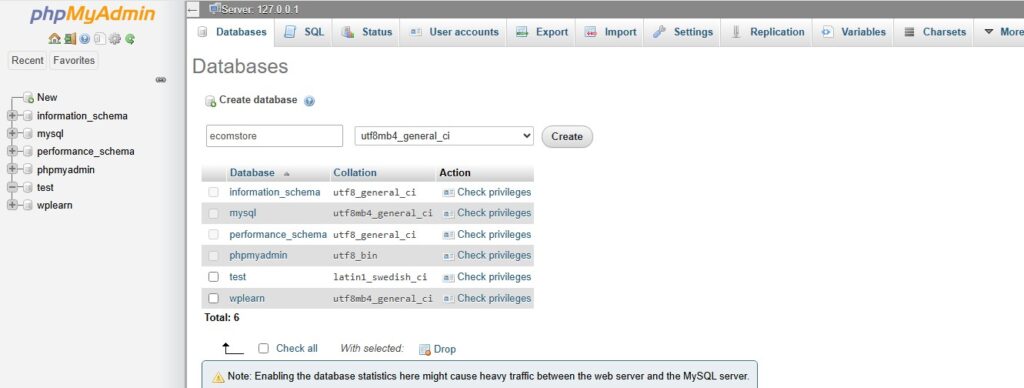
Alternatively, you can create the database by executing the following SQL query. This approach is particularly useful when you want to create databases directly through SQL rather than using the graphical interface.
CREATE DATABASE ecomstore;2 – How to create a table in database
After creating the database, the next step is to create a table to store product details. In general, a database table organizes information into rows and columns. For example, our product table will contain the product ID, name, price, and availability status.
To create this table, you can use either of the following methods. First, you can create it manually through the phpMyAdmin graphical interface, which allows you to define columns and their data types using a visual menu, as shown in the screenshot below.
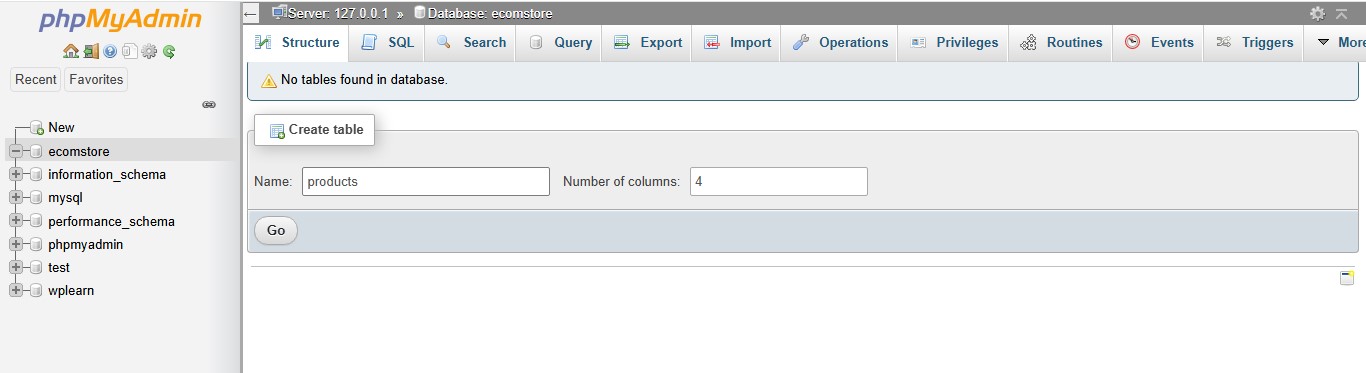
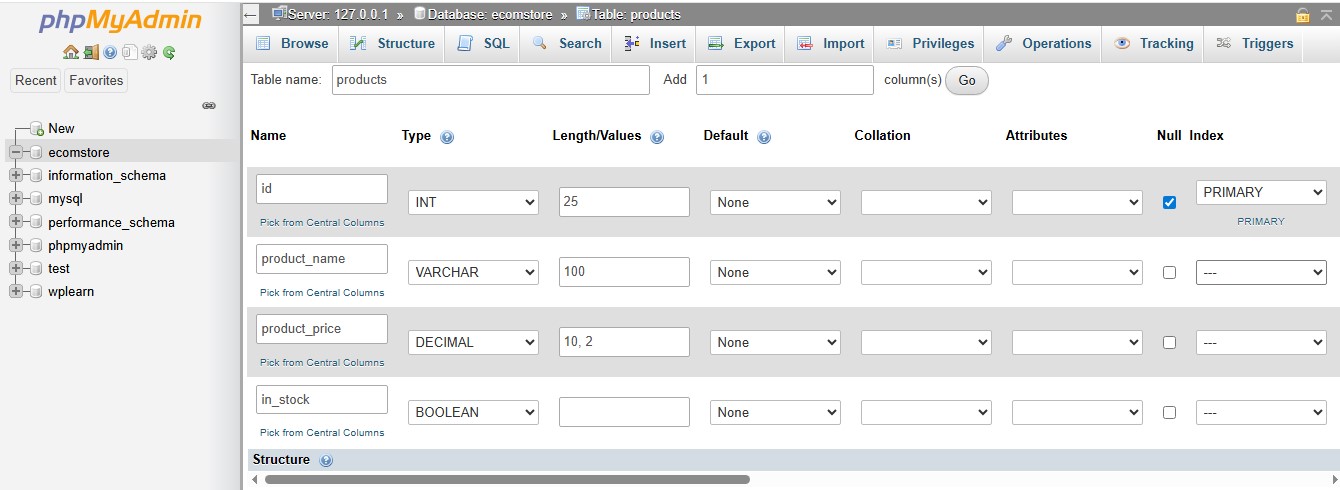
Alternatively, you can automate the process by executing the following SQL query within your index.php file. As a result, the table can be created programmatically when the script runs, provided the database connection is established and the table does not already exist.
CREATE TABLE products (
    id INT AUTO_INCREMENT PRIMARY KEY,
    name VARCHAR(100),
    price DECIMAL(10,2),
    in_stock BOOLEAN
);This query creates a new table named products with four specific columns. To begin, here is the breakdown of what each part does:
CREATE TABLE products: Tells the database to reserve space for a new entity named “products”.
id: The name of the column.
INT: It stores whole numbers.
AUTO_INCREMENT: MySQL will automatically assign a new, unique number (1, 2, 3…) every time you add a product.
PRIMARY KEY: This marks the id as the unique identifier for every row, ensuring no two products have the same ID.
name VARCHAR(100): Creates a column for the product name that can hold up to 100 characters. It only uses as much space as the text requires.
price DECIMAL(10,2): Used for exact precision (crucial for money). This number can be up to 10 digits long in total, with 2 digits after the decimal point (e.g., 99.99).
in_stock BOOLEAN: Stores a true/false value (internally in MySQL, this is usually stored as 1 for true and 0 for false).
3 – How to connect PHP with MySQL
To connect PHP with MySQL, create a new file named db-connection.php in your project directory.
<?php
$host = "localhost";
$username = "root";
$password = "";
$database = "ecomstore";

$connection = mysqli_connect( $host, $username, $password, $database );

if( ! $connection ) {
    die( "Database connection failed: " .  mysqli_connect_error() );
}
?>mysqli_connect() is a built-in PHP function used to establish a connection between PHP script and a MySQL database.
4 – How to insert product data into the database
To insert data into your products table, you will use the MySQL INSERT INTO statement.
INSERT INTO products (name, price, in_stock)
VALUES
('Keyboard', 899.50, 1),
('Mouse', 499.00, 1),
('Monitor', 7999.99, 0),
('Printer', 2499.99, 1),
('Laptop', 27999.49, 1);This is a SQL (Structured Query Language) query used to add new data to a database. Specifically, it uses the INSERT INTO statement to populate a table named products.
INSERT INTO products (name, price, in_stock): This tells the database you want to add new rows to the “products” table. The names in the parentheses specify which columns you are filling.
VALUES: This keyword introduces the actual data being inserted. In short, it will insert 5 new records into ‘products’ table.
5 – How to fetch product data from the database
To fetch data from your products table, you use the SQL SELECT statement.
In order to fetch all records:
SELECT * FROM products;To fetch specific columns:
SELECT name, price FROM products;To fetch data using WHERE condition:
SELECT * FROM products WHERE in_stock = TRUE;This is a SQL filter (WHERE clause) used to narrow down your results.
Instead of showing every item in your inventory, it tells the database: Only give me the rows where the item is currently available.
To fetch data with ORDER BY:
SELECT * FROM products ORDER BY price ASC;This is a SQL sorting (ORDER BY clause) query used to organize the list. It tells the database: Show me all products, but list them starting with the lowest price.
6 – How to display the data in a table using PHP loops
To display the fetched product data, you usually output it inside HTML so it looks clean on the webpage.
<?php
$sql = "SELECT * FROM products";
$result = mysqli_query($conn, $sql);

if (mysqli_num_rows($result) > 0) {

    echo "<table border='1' cellpadding='10' cellspacing='0'>";
    echo "<tr>
            <th>ID</th>
            <th>Name</th>
            <th>Price (₹)</th>
            <th>In Stock</th>
          </tr>";

    while ($row = mysqli_fetch_assoc($result)) {

        echo "<tr>";
        echo "<td>" . $row["id"] . "</td>";
        echo "<td>" . $row["name"] . "</td>";
        echo "<td>" . $row["price"] . "</td>";
        echo "<td>" . ($row["in_stock"] ? "Yes" : "No") . "</td>";
        echo "</tr>";
    }

    echo "</table>";

} else {
    echo "No products found.";
}
?>This PHP script retrieves all the data from your products table and displays it in a clean, formatted HTML table. To understand how it works, let’s break down the key parts of the code:
SELECT *: This SQL statement tells the database to retrieve all columns from the products table.
mysqli_query($conn, $sql): Next, this function executes the SQL query using your database connection.
mysqli_num_rows($result) > 0: Additionally, this condition checks whether the query returned any rows containing product data. If products are available, the script can display them in the HTML table. Otherwise, it displays a “No products found” message.
Conclusion
In this tutorial, you learned how to create a database table, insert sample data, and fetch those records using SQL queries. First, you explored how to create a database table. Next, you learned how to insert sample data and retrieve those records using SQL queries. As a result, you now understand the complete process, from database creation to displaying data on a webpage. Finally, this simple example provides a strong foundation for working with PHP and MySQL in real-world projects.
If you enjoyed this article, we’d love to hear your thoughts. Feel free to share your feedback, questions, or suggestions in the comments section below.
If you have any questions or would like to get in touch with us, please don’t hesitate to reach out us.